Equipment Tag System with AI
AI-powered tag extraction from engineering drawings — automatically identify, categorise, and validate equipment tags against your company standards.
Intelligent Drawing Analysis
The Equipment Tag System with AI processes engineering drawings — P&IDs, single-line diagrams, general arrangements — and uses artificial intelligence to automatically extract every equipment tag from the document. Tags are highlighted directly on the drawing and presented in a structured table, ready for validation against your company’s naming standards.
How It Works
Upload an engineering drawing in any standard format. The AI scans the entire document, identifies equipment tags using pattern recognition and contextual analysis, and extracts them with their positions. Each tag is highlighted on the original drawing for visual verification.
Standards Compliance
Extracted tags are automatically parsed and validated against your company’s tagging standards. The system breaks down each tag into its components — facility, module, sequence, pipe configuration — and flags any deviations from the expected naming conventions.
AI-Powered Tag Extraction
Upload a P&ID or engineering drawing — the AI identifies and highlights every equipment tag on the document.
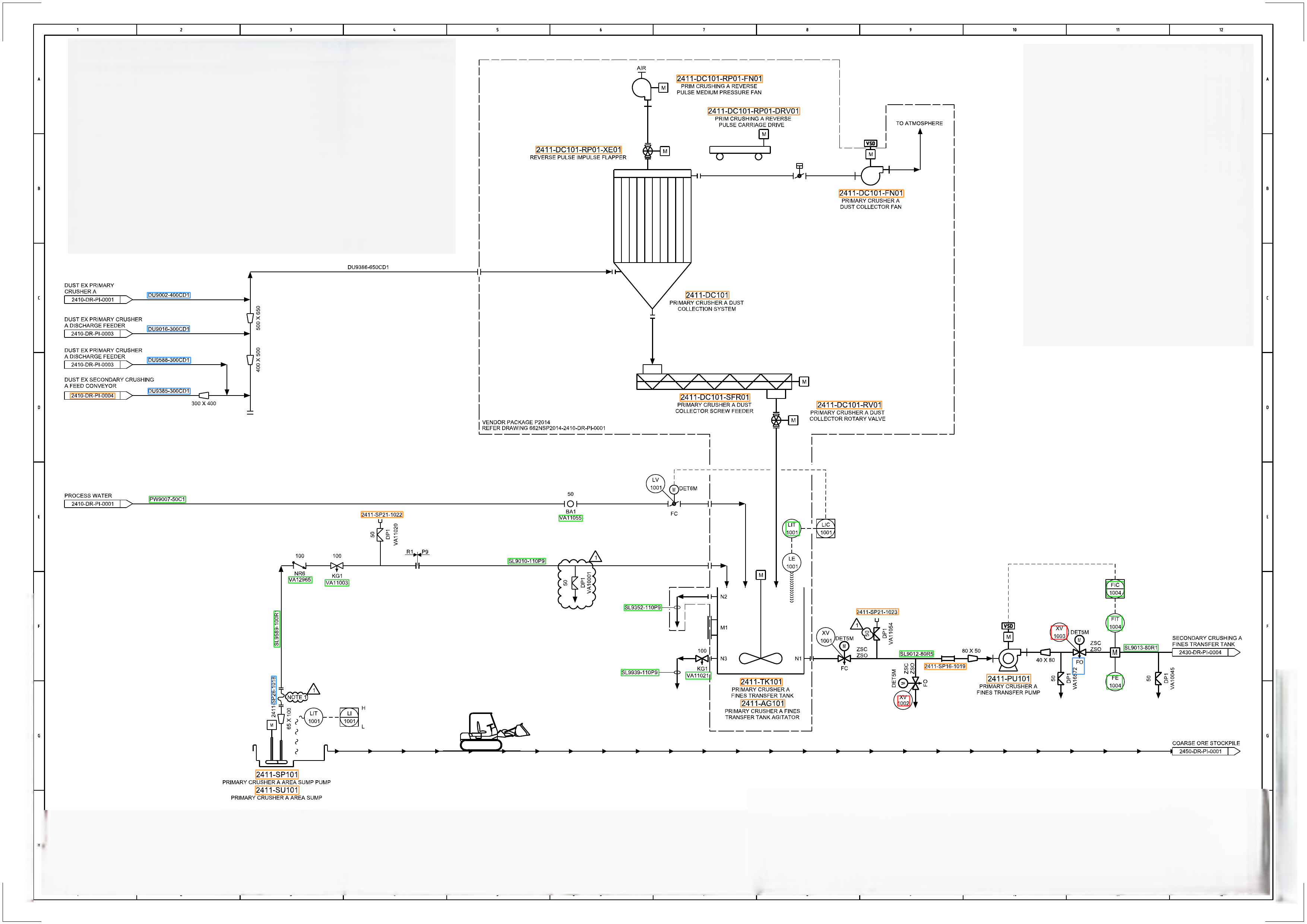
Upload Drawing
Support for P&IDs, single-line diagrams, GAs, and other engineering document formats.
AI Scans & Detects
Machine learning identifies tag patterns across the entire drawing with high accuracy.
Tags Highlighted
Every detected tag is highlighted on the original drawing for immediate visual verification.
Tag Review & Validation
Extracted tags are listed in a structured table, parsed into components, and checked against company standards.
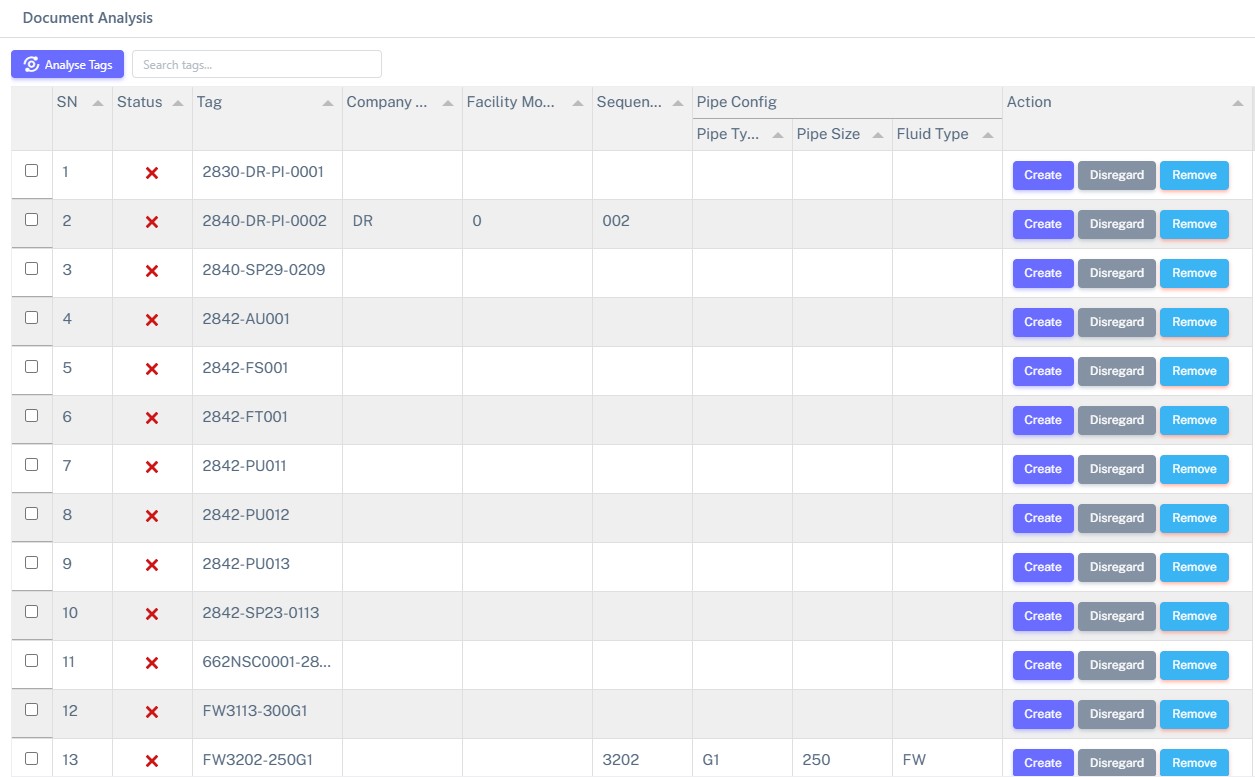
Structured Listing
Tags listed with serial number, status, and parsed components.
Component Breakdown
Company module, facility, sequence, pipe type, size, and fluid type.
Status Tracking
Real-time status for each tag — validated, pending, or flagged.
Create / Disregard / Remove
One-click actions to approve, skip, or remove each extracted tag.
Key Capabilities
AI Tag Recognition
Advanced pattern recognition trained on engineering naming conventions detects equipment tags across P&IDs, isometrics, and GA drawings with high precision.
Company Standard Validation
Automatically checks each extracted tag against your organisation’s tagging mask and naming conventions. Flags non-compliant tags instantly.
Categorical Organisation
Tags are parsed into structured components — facility code, module, sequence number, pipe configuration — for organised review and management.
Drawing Highlighting
Detected tags are highlighted directly on the source drawing, making it easy to visually verify each extraction and locate tags in context.
Search & Filter
Quickly search and filter through extracted tags by name, type, status, or component. Find specific tags across large drawing sets in seconds.
TAG-G Integration
Validated tags can be pushed directly to the Asset Tagging System (TAG-G) for registration, duplicate checking, and lifecycle management.
The ETAI Process
From drawing upload to validated tag register — four simple steps.
Upload Drawing
Upload engineering drawings in PDF, DWG, or image format. The system accepts P&IDs, single-line diagrams, and general arrangements.
AI Extraction
The AI engine scans the drawing, identifies all equipment tags using trained pattern recognition, and highlights them on the document.
Review & Validate
Extracted tags appear in a structured table. Each tag is parsed against company standards. Review status and take action — create, disregard, or remove.
Export & Register
Approved tags are exported to your tag register or pushed directly to TAG-G for asset registration and lifecycle tracking.
Frequently Asked Questions
Automate Your Tag Extraction
Stop manually reading through drawings. Let AI extract, categorise, and validate your equipment tags in minutes.